Finch Island · Singapore

AI that works inside your business.

Finch Island designs and builds AI systems, automation and custom software around the tools, data and processes your company already uses.

From focused SME automation to enterprise AI integration.

System workflow / RFQ Controlled
AI

Requirement extractionReads the request and converts relevant information into structured fields.

AI Company data Human control

What we are

Finch Island is a Singapore AI systems & software company.

  1. We automate processes.
  2. We integrate existing systems.
  3. We build software when off-the-shelf tools aren't enough.

Existing systems

Keep the systems that already work.

Finch Island can build AI and automation around the software, data and workflows your company already relies on.

The objective is usually to connect systems intelligently, not replace functioning infrastructure without reason.

Your systems stay in the workflow.

Systems02

productivityExample connection

Microsoft 365

Email, documents, forms and collaboration tools can participate in controlled workflows through approved Microsoft interfaces.

inputOutlook enquiry
aiExtract requirements
dataProduct / ERP lookup
ruleBusiness rules
humanCommercial approval
outputReply + CRM update

Potential connections

  • Outlook and shared mailboxes
  • SharePoint and OneDrive content
  • Teams interfaces
  • Structured follow-up tasks

Exact capabilities depend on the customer's systems, APIs, authentication and permissions.
The work between systems

Your business probably doesn't need another AI subscription.

Most companies already have plenty of software. The manual work usually happens between it — reading an email, checking a spreadsheet, finding something in an ERP, preparing a document, getting approval and updating another system.

That is the workflow we look at.

Current process

Today

A customer emails a requirement. The information then moves through several tools and hand-offs before the work is complete.

  1. InputCustomer enquiry

    A requirement arrives by email.

  2. SoftwareEmail inbox
    open and read
  3. HumanCheck the requirements
    manual review
  4. SoftwareSpreadsheet
    copy details
  5. DataERP / product data
    system switch
  6. HumanAsk for missing information
    human lookup
  7. SoftwareQuotation template
    prepare and send
  8. SoftwareCRM
    duplicate entry
  9. HumanRemember the follow-up
    separate task

Every tool may be doing its job. The process between them is still manual.

The problem isn't the software.

It's the work required to move information between it.

Coordinated process

With Finch

The same enquiry can move through one controlled workflow. AI handles an appropriate task; rules, data, integrations and people handle the rest.

  1. InputCustomer enquiry

    The existing email or portal remains the starting point.

  2. AIExtract requirements
    confidence check
  3. Business ruleRequired fields check
    deterministic validation
  4. DataRetrieve ERP / product data
    permission-scoped lookup
  5. IntegrationCheck company knowledge
    authorised retrieval
  6. HumanSales review

    A person checks the prepared quotation before release.

    approval

Once approved

Output · 01Quote sent

The approved response is released.

Output · 02CRM updated

The customer record is kept current.

Output · 03Follow-up created

The next action is recorded.

Automate the repetitive work while keeping people in the decisions that matter.

A better starting point

The first step isn't choosing an AI model. It's identifying the part of the process that should work better.

Example workflow · exact implementation depends on available systems, APIs, permissions and business rules.

Start with the process

What is taking too much time?

You don't need to know what technology you need. Pick the work your team is doing manually and explore what a better workflow might involve.

Choose a problem08 examples

Example system · not a fixed product

Preparing quotations

Quotation work often combines customer emails, technical requirements, product or ERP data, pricing logic, internal clarification, approval and CRM updates.

AIIntegrationBusiness rulesHuman approval

Example workflow

  1. InputCustomer enquiry
  2. AIExtract requirements
  3. Business ruleValidate required information
  4. DataRetrieve product and pricing data
  5. SoftwarePrepare quotation draft
  6. HumanCommercial approval
  7. OutputQuote, CRM and follow-up

Likely components

  • Email integration
  • Document extraction
  • ERP lookup
  • Business rules
  • Quotation generation
  • Approval workflow
  • CRM integration
Start with the work.

The technology comes after we understand what the process actually needs.

Once the problem is clear, the right system becomes easier to design.

What we build

We build the intelligence between your systems.

Some projects need AI. Some need automation. Some need better software or integration. Most useful systems combine several of these things.

These are engineering capabilities—not isolated products.

/ Capability

Workflow Automation

Coordinate repetitive work that moves between email, spreadsheets, business applications, databases and people.

  • Enquiry to quotation
  • Invoice to approval
  • Order to ERP update
  • Report request to draft
Illustrative workflow · predictable work connected
Before

EmailExcelPersonERPPersonCRM

Coordinated

EmailWorkflowValidationApproval

ERP updateCRM update

/ Capability

AI Agents

Multi-step AI systems that can interpret information, use approved tools, retrieve company data and perform defined actions inside a controlled workflow.

  • RFQ processing
  • Sales assistance
  • Support assistance
  • Internal task orchestration
Agent architecture · approved tools and escalation
Request
AIAgentDefined task
CRMToolCompany dataRetrievalAPIAction
Business rulesHuman escalation
Approved action

/ Capability

Document Intelligence

Extract, classify, compare and process information from documents so it can become part of a usable business workflow.

  • RFQs and quotations
  • Invoices and purchase orders
  • Contracts
  • Technical forms and reports
Example interface · document to validated data
RFQ.pdfPage 01 / 03

Part AX-204

Quantity 5,000

Material

Delivery 6 wk

Structured requirementReview

PartAX-204

Quantity5,000

MaterialMissing

Delivery6 weeks

ExtractValidateReview exceptionUse data

/ Capability

Enterprise Knowledge Systems

Give authorised employees a practical AI interface to company documents, policies, manuals, databases and other approved knowledge.

  • Policy questions
  • Technical knowledge
  • Operational procedures
  • SharePoint and database search
Knowledge path · identity before retrieval
Employee question
01Identity02Permissions
SOPsSharePointDatabase
Relevant evidence
Grounded answerSources cited

/ Capability

AI & System Integration

Connect AI models and new software with the systems, APIs and data already inside the business.

  • CRM and ERP
  • Email and documents
  • Databases
  • Internal and custom APIs
Integration layer · access stays controlled
AI model
EmailIntegration layerAuthentication · permissions · logsERP
DatabaseCRMInternal API

/ Capability

Custom Business Software

When an existing SaaS product does not fit the workflow, Finch Island can build the application around the process instead.

  • Internal portals
  • Operations platforms
  • Approval systems
  • Customer and job-management tools
Example interface · operations queue
Operations Queue03 open items
JobStatusOwnerNext action
RFQ-0142ReviewSalesApprove
RFQ-0143Missing dataRequest info
RFQ-0144ReadyMillerSend quote

System design

The technology depends on the process.

We choose the components after understanding what the system needs to do, what it needs to connect to and where people should remain in control.

The same capabilities look different depending on the team and process they support.

Solutions by team

AI for the work your teams already do.

Explore practical systems around a department and the work already moving through it.

Start with the job. Then decide where AI, software, rules and people belong.
Sales

Prepare quotations, understand enquiries and keep commercial follow-up connected to customer and product information.

Selected systemSales

Quotation Automation

Connect incoming enquiries with requirement extraction, product and pricing data, deterministic checks, commercial approval and downstream sales actions.

Representative workflow · exact design depends on the operating environment
  1. InputCustomer enquiry
  2. AIExtract requirements
  3. DataProduct / ERP lookup
  4. RulePricing and completeness
  5. HumanCommercial approval
  6. OutputQuote + CRM + follow-up

Some solution steps use AI. Others are better handled by conventional software. Access and actions remain subject to the customer's authentication, permissions and system capabilities.

A closer look

Want to see one end to end?

Quotation automation is a useful example: one RFQ can move through extraction, company data, business rules, approval and connected systems.

System walkthrough

Finch Solution Demonstration

Follow an RFQ through a Finch system.

A real AI workflow is more than a prompt. Follow one customer RFQ from the inbox through extraction, company data, validation, human approval and the systems that need updating afterwards.

Example architecture · not a claimed customer deployment
Finch Solution DemonstrationIllustrative workflow · synthetic data
AIRuleDataIntegrationSoftwareHumanOutput
  1. 03 / 12AI

    Requirements extracted

    AI interprets the email and permitted attachments, converting quantities, specifications, dates and commercial requirements into structured fields.

    Unstructured request

    Please quote 5,000 pcs of AX-204. Required delivery: October. Drawing rev C attached. Material requirement is per attached specification.

    Structured RFQ

    PartAX-204

    Quantity5,000

    DeliveryOctober

    DrawingRev C

    SpecificationAttachment detected

Approved event
Quote sentCRM updatedFollow-up created

This one workflow combines

  • AI extraction
  • Deterministic validation
  • Company data
  • System integration
  • Business logic
  • Human approval
  • Document generation
  • CRM automation
  • Follow-up automation

This is what building a system means.

AI is one component. Validation, company data, integration, business logic, human approval and downstream software make the result operational.

Discuss a workflow like this

That was one example. Your workflow will be different.

Describe yours.

Process analysis is introduced in the next section. No information is collected here.

Try Finch

Describe a repetitive process.

See how Finch might approach it.

Explain something your team currently does manually. We'll break the process into steps and show where AI, automation, integrations, software and human decisions might fit.

Preliminary workflow analysis only. A real implementation requires your actual systems, rules, data and security requirements.
Public demoText only · no files

Helpful detail: what starts the process, what your team does, which systems are involved and what needs to happen at the end.

Use a generalised example.

Please don't include confidential company information, personal data, passwords, credentials or commercially sensitive material in this public demo.

General business-process descriptions only0 / 2,400
Start with an example

Public demo reminder · Do not submit confidential, personal or commercially sensitive information.

Document intelligence

Turn unstructured documents into usable business data.

RFQs, invoices, supplier quotations, forms and technical documents often contain information another business system needs. Finch can extract that information, validate it and route it into a controlled workflow.

Extraction is only the first step.
  1. 01Document
  2. 02Identify
  3. 03Extract
  4. 04Validate
  5. 05Review exceptions
  6. 06Use the data
Public demoBundled samples · no upload
Use sample documents or non-sensitive test files only.

Do not upload confidential, personal or commercially sensitive information. Public file upload is intentionally not enabled in this preview.

Source document

Customer RFQ

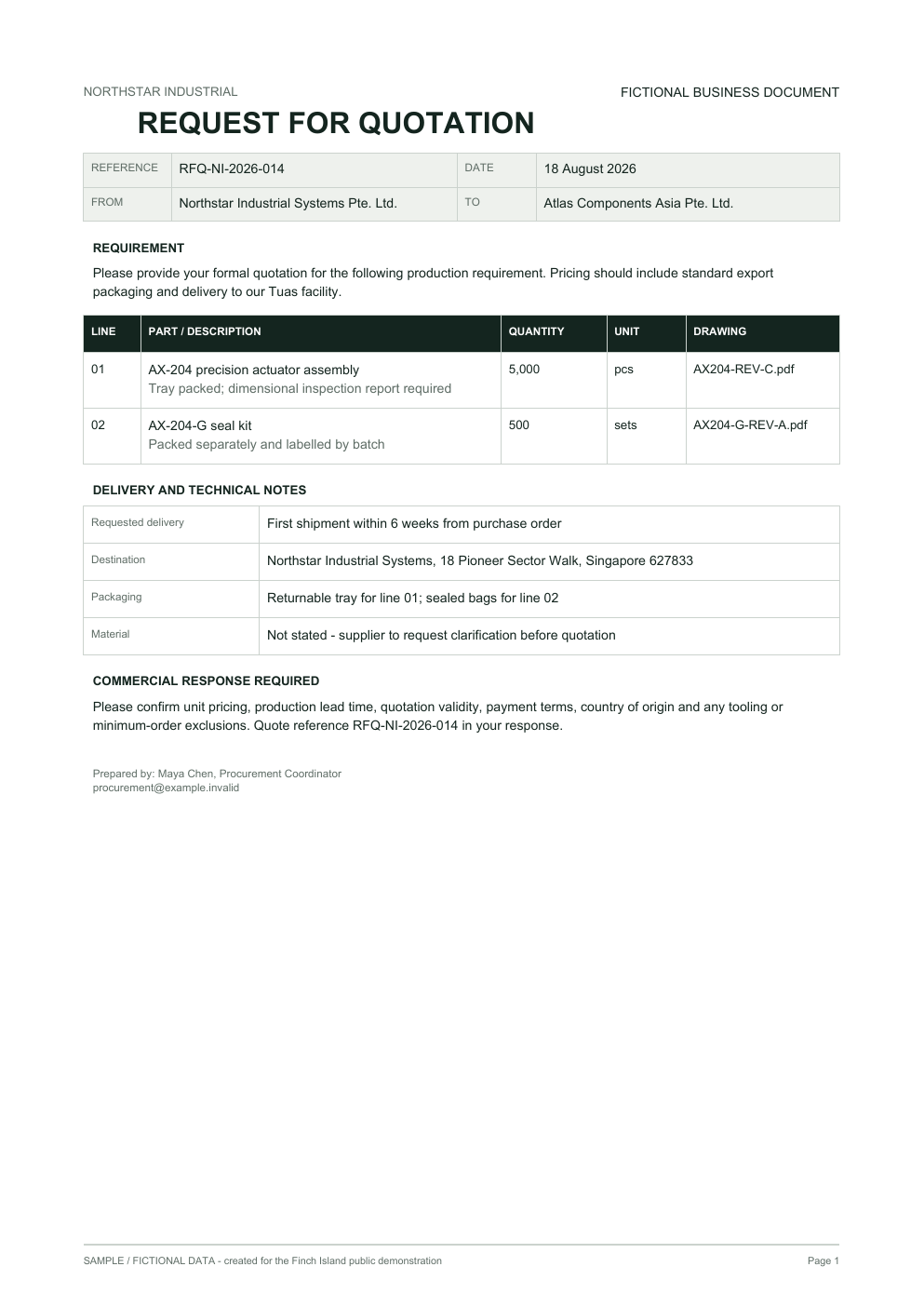
Example document · fictional data
Preview of a fictional customer RFQ containing two requested items, delivery requirements and a missing material specification.
One-page synthetic PDF prepared for this public demonstration.
View full sample PDF
Example processed resultPrecomputed · schema validated

Customer RFQ

A customer request for two actuator-related items, delivery to Singapore and a controlled commercial response.

Review required
AI extraction

Extracted fields

RFQ referenceFound
RFQ-NI-2026-014
SourceREFERENCE RFQ-NI-2026-014
CustomerFound
Northstar Industrial Systems Pte. Ltd.
SourceFROM Northstar Industrial Systems Pte. Ltd.
Request dateFound
18 August 2026
SourceDATE 18 August 2026
Requested deliveryFound
First shipment within 6 weeks from purchase order
SourceFirst shipment within 6 weeks from purchase order
DestinationFound
18 Pioneer Sector Walk, Singapore 627833
SourceDestination: Northstar Industrial Systems, 18 Pioneer Sector Walk, Singapore 627833
Material specificationMissing
Not found in document
Drawing referencesFound
AX204-REV-C.pdf; AX204-G-REV-A.pdf
SourceDRAWING AX204-REV-C.pdf / AX204-G-REV-A.pdf
Commercial responseFound
Unit pricing, lead time, validity, payment terms, origin and exclusions
SourcePlease confirm unit pricing, production lead time, quotation validity, payment terms...
Structured extraction

Line items

Item 01AX-204
AX-204 precision actuator assembly
Quantity
5,000
Item 02AX-204-G
AX-204-G seal kit
Quantity
500
Example validation · deterministic rules

AI extracts. Software checks.

  • RFQ reference · Found

    RFQ reference is available for the example workflow.

  • Customer · Found

    Customer is available for the example workflow.

  • Requested delivery · Found

    Requested delivery is available for the example workflow.

  • Destination · Found

    Destination is available for the example workflow.

  • !
    Material specification · Missing

    Material specification is required by this example workflow but was not found.

The material specification is not stated and should not be inferred from the drawing filename.

Workflow possibilities

What could happen next?

  1. 01Create a requirements record
  2. 02Request missing technical information
  3. 03Retrieve approved product data
  4. 04Begin a controlled quotation workflow
Human review

Missing or ambiguous technical requirements should be reviewed before quotation logic continues.

Missing information should be surfaced, not guessed.Document → structured record → validation → controlled next action

Some workflows need to extract information from one document. Others need to find the right information across thousands of authorised documents and data sources.

Enterprise knowledge

Your company already knows the answer.

The problem is finding it.

Finch Island can build secure knowledge systems that help authorised employees search company documents, policies, manuals, databases and other approved sources using natural language.

01 · PermissionThe model should only see what the user is allowed to retrieve.

02 · EvidenceGround the answer. Show the source.

03 · RestraintNo evidence? No invented policy.

Northstar ManufacturingFictional company · sample knowledge only
Demo access profile

Operations

Production deployments use the customer's actual identity, authentication and permission model.

Demo access profile: Operations. Receiving, product-handling and general employee procedures.

Ask one question about Northstar Manufacturing's fictional approved policies, procedures or manuals.

Public demo · do not enter confidential, personal or commercially sensitive information.69 / 800
Questions for Operations

When live generation is available, the question and retrieved fictional evidence are processed by the configured AI provider. Finch application code does not intentionally persist public questions or answers.

Knowledge is only one part of the architecture. The same system may also need to read email, query an ERP, update a CRM or call an internal API.

AI integrations

What does your company already run on?

Finch Island can connect AI and custom software with existing business systems, APIs, databases, documents and communication tools—without assuming that working software needs to be replaced.

The exact architecture depends on the system, available APIs, authentication model and what the workflow is allowed to do.
Integrate before replacing.

AI does not magically “see” business systems. Authentication, permissions, mapping, validation and application logic define the connection.

System architecture explorer33 example systems & patterns · local data only

Selected · ProductivityBusiness system

Microsoft 365

Email, documents, forms and collaboration tools can participate in controlled workflows through approved Microsoft interfaces.

Example architecture · not a connected customer account or claimed deployment
Connection surface

What Finch might connect

Inputs
  • Email
  • SharePoint document
  • Form
  • Teams interaction
Outputs
  • Draft response
  • Task
  • Structured data
  • Workflow event
  • Outlook and shared mailboxes
  • SharePoint and OneDrive content
  • Teams interfaces
  • Structured follow-up tasks
Data direction

What the connection may do

ReadRetrieve approved information

Approved mail and files

WriteCreate or update approved information

Draft, task or approved document

TriggerReact to a configured event

Message, file or form event

Exact actions depend on the available interface, account configuration and permissions.
Example architecture · event

Sales enquiry architecture

Connect an Outlook enquiry to product context, approval and CRM follow-up.

Integration / workflow layerAuthentication · mapping · validation · exceptions
  1. inputOutlook enquiry
  2. aiExtract requirements
  3. dataProduct / ERP lookup
  4. ruleBusiness rules
  5. humanCommercial approval
  6. outputReply + CRM update
Access & authentication

Integration does not mean unlimited access.

  • Microsoft OAuth
  • Approved application registration
  • Customer-approved service identity

Capabilities depend on Microsoft Graph permissions, tenant configuration and customer security requirements.

The workflow should receive only the scopes needed for its defined task.

No credentials are requested in this public architecture explorer.
Human control

Approval where the action matters.

Material emails, document releases and business-system writes can require explicit approval.

PrepareValidateHuman approvalWrite
Synthetic demonstration

Illustrative audit trail

14:02Access boundary checkedPassed
14:03Input mapped + validatedPrepared
14:03Approved action / exceptionRecorded

Repeated events should not accidentally create duplicate records. Failures should retry where safe or enter a visible exception path.

Content graph

Related Finch systems

Future industry relationships are prepared in the content model but remain unpublished until substantive industry pages exist.

01 · Deterministic

This may not need AI.

If the mapping is predictable, conventional integration software is usually the better choice.

02 · Exceptions

Failures should surface.

Retry where safe, then log, notify or route the exception for human review.

03 · Data boundary

Constrain database access.

Use application logic, parameterised queries, scoped roles and validation—not unrestricted model access.

The architecture starts with existing systems. But the systems alone do not define the workflow.

Industries

The systems may be similar. The workflows are not.

AI, automation and business software need to fit the way an organisation actually operates. Explore examples of how Finch Island capabilities could be applied across different industries.

Start with the work, systems and constraints—then design the architecture around them.

Selected industry · 01Operational context

Manufacturing & Engineering

RFQs, technical documents, product information and operational records often move between email, ERP systems, spreadsheets, document repositories and people. Finch can design controlled workflows around those hand-offs without pretending every technical decision belongs to AI.

Common work

Where the hand-offs appear

  1. 01
    RFQs arrive in several formats

    Email, PDF, spreadsheet and representative technical files require one intake process.

  2. 02
    Product information lives elsewhere

    ERP records, databases, spreadsheets and technical documents provide different parts of the answer.

  3. 03
    Quotation work requires several checks

    Requirements, product fit, pricing, lead time and approval need explicit ownership.

  4. 04
    Quality information is difficult to locate

    SOPs, specifications, inspection procedures and work instructions need controlled retrieval.

  5. 05
    Supplier information needs comparison

    Quotes, lead times and commercial terms arrive in documents that staff reconcile manually.

  6. 06
    Reporting crosses operating systems

    Sales, quality and operations information often needs validation before consolidation.

Example workflow

Technical RFQ → Quotation

A compact version of the RFQ workflow: interpret the request, validate technical and business data, then keep commercial release with a person.

Manufacturing · representative architectureActual design follows the customer environment
  1. InputCustomer RFQ
  2. DocumentExtract requirements
  3. ValidationTechnical checks
  4. DataERP / product lookup
  5. RulesPricing + completeness
  6. HumanCommercial review
  7. OutputQuotation
  8. IntegrationCRM follow-up
Typical context

Systems involved

  • ERP
  • CRM
  • Email
  • Product database
  • Quality repository
  • Spreadsheets
  • SQL databases
Typical information

Documents & data

  • RFQs
  • Drawings
  • Specifications
  • Supplier quotations
  • Quality procedures
  • Inspection reports
  • Work instructions
  • Purchase orders
Related solutions

Relevant Finch systems

  1. 01AI RFQ Processing
  2. 02Quotation Automation
  3. 03Supplier Quotation Comparison
  4. 04SOP Assistant
  5. 05Management Reporting
Capabilities

Finch building blocks

Integration context

Example connected systems

  • Email
  • SAP
  • SharePoint
  • PostgreSQL
  • REST APIs
  • Custom / Internal System

Not every problem in these workflows needs a model. Some need a better application, database, API or interface.

Custom business software

Sometimes the answer isn't AI.

Sometimes a process needs a better interface. Sometimes it needs a database, API, approval system or internal application. Sometimes the simplest reliable software is the right solution.

We build that too.
System principle · 01

AI is a component. Software is the system around it.

Permissions, calculations, validation, record updates and critical business rules often belong in deterministic application code—not in model output.

Example application · fictional data

Operations Queue

Work requiring a person remains visible, owned and traceable.

Open
5
Needs review
4
Waiting
1
Completed
1
6 of 6 records

Fictional operations records

Record detail

RFQ-0143

Missing Data
Workflow
Quotation
Owner
Unassigned
Current step
Clarification
Next action
Request information
Application data
Partconfirmed
BT-118
Quantityconfirmed
800
Deliveryextracted
4 weeks
Destinationmissing
Not found

AI-extracted information becomes application data only after validation rules are satisfied.

Activity · synthetic timeline
  1. Fictional RFQ createdSystem
  2. Requirements extractedAI component
  3. Required destination not foundValidation rule
Local demonstration only. No email, approval or system update is sent.

What the software can be

Business applications, not packaged products.

Each system is shaped around its users, workflow, information and existing technology environment.

  1. 01

    Internal Operations Systems

    Applications employees use to run work with explicit records, owners, states and exceptions.

    • Job queues
    • Task assignment
    • Operational records
  2. 02

    Workflow & Approval Applications

    Interfaces that validate requests, apply routing rules and preserve approval history.

    • Requests
    • Approvals
    • Audit trails
  3. 03

    Customer & Partner Portals

    Controlled interfaces for requests, documents, status, support and collaboration.

    • Project status
    • Document exchange
    • Support
  4. 04

    Data & Reporting Platforms

    Purpose-built views that consolidate authorised data and make operating status visible.

    • Dashboards
    • Exports
    • Management reporting
  5. 05

    Admin & Back-Office Systems

    Tools for configuration, permissions, record management and operational control.

    • Configuration
    • Permissions
    • Content operations
  6. 06

    APIs & Backend Services

    Server-side software that connects data, workflows, existing applications and optional AI components.

    • Application APIs
    • Scheduled jobs
    • Integration services

Application architecture

Reliable software should stay predictable.

The business rule should still work when the model doesn't. Production applications preserve state, surface failures and keep a manual path available.

Representative architectureServer-side credentials · role-based access · auditability
  1. 01User interfaceForms · queue · responsive workflow
  2. 02Application APIAuthentication · server-side validation
  3. 03Application logicState · ownership · routing
  4. 04Business rulesRequired fields · calculations · approvals
  5. 05DatabaseDurable records · activity · configuration
  6. 06IntegrationsERP · CRM · email · internal systems
State

Business processes have state.

The application records what happened, what is waiting, who owns the next step and what can happen next.

Access

Permissions belong in the application, not in a prompt.

Authentication and role-based access are enforced by the system architecture.

Operations

You should be able to see when a workflow fails.

Errors, failed integrations, retries and exceptions need visible status and ownership.

Build or buy

When is custom software worth considering?

Finch Island is not automatically biased toward building. We evaluate what already exists, what can be integrated and where custom software adds enough value to maintain.

Consider building

  1. 01

    The process does not fit existing softwareEmployees maintain workarounds around the product.

  2. 02

    Several systems need one workflow interfacePeople repeatedly switch tools to complete one piece of work.

  3. 03

    Business-specific rules matterGeneric software cannot model validation, state or approval cleanly.

  4. 04

    A spreadsheet has become the operating systemSeveral people, statuses and integrations now depend on it.

  5. 05

    Permissions and approvals are complexThe organisation needs controlled access and an auditable history.

  6. 06

    The software is part of the serviceCustomers or partners need a specialised operating interface.

Software delivery

Coding is not the first step.

We first need to understand users, workflow states, exceptions, data ownership and the systems around the application.

  1. 01Map
  2. 02Model
  3. 03Build
  4. 04Integrate
  5. 05Test
  6. 06Deploy
  7. 07Improve

Custom software becomes part of the business and needs maintenance, monitoring and improvement after release.

The useful system

Build the system the process actually needs.

That may be an AI-assisted workflow. It may be an internal application. It may be an API and database. Often, it is a combination.

Discuss a software project

Architecture is easier to believe when you can see the system.

Work

Systems built around real workflows.

Some work can be published as client projects. Other examples are Finch-built demonstrations designed to show how a particular system could work.

We label the difference clearly.

Finch DemonstrationInteractive Demo

AI RFQ Processing System

RFQs arrive through email and documents, while pricing, approval and CRM workflows need complete structured information.

Finch DemonstrationInteractive Demo

Document Intelligence for RFQs and Invoices

Business documents contain information that another system needs, but layouts vary and required data can be incomplete or inconsistent.

Finch DemonstrationInteractive Demo

Permission-Aware Enterprise Knowledge Assistant

Employees need answers from company knowledge, but access boundaries and source evidence matter as much as response quality.

Finch DemonstrationInteractive Demo

Operations Workflow Application

A core process spread across messages and spreadsheets lacks durable state, clear ownership, exception visibility and an auditable next action.

Evidence

Proof should be inspectable.

Where we can show the system, we do. Where work is confidential, we do not invent a case study to fill the space.

Explore Work

Seeing the system is one thing. Building it safely around a real business process requires a disciplined delivery approach.

How we work

The process starts with yours.

A working demo is only one part of delivery. Production systems need to fit real processes, users, data, controls and the technology already in place.

See versions early. Test assumptions before they become expensive.
  1. 01 / 06

    Understand

    What actually happens today?

    We map the work as it is performed—not only how a procedure says it should work. Users, triggers, inputs, systems, decisions, hand-offs and exceptions become visible.

    Work in this stage

    • Speak with the people doing the work
    • Trace a representative case end to end
    • Identify duplicate entry and system switching
    • Record decisions, approvals and exceptions
    • Separate process problems from technology problems

    Tangible outputs

    • Current workflow map
    • System inventory
    • Process requirements
    • Automation candidates
    • Constraints and unknowns
    Artefact previewCurrent workflow mapA visible baseline before solution design
  2. 02 / 06

    Design

    What should the system do instead?

    We define the future workflow and decide which parts belong to AI, rules, conventional software, company data, integrations and people.

    Work in this stage

    • Model the target workflow and states
    • Define component and data boundaries
    • Place human approvals deliberately
    • Design permission and exception paths
    • Choose integration points and fallbacks

    Tangible outputs

    • Target workflow
    • Solution architecture
    • Data and access model
    • Human-control model
    • Integration plan
    Artefact previewSolution architectureResponsibilities stay distinct and inspectable
  3. 03 / 06

    Build

    Can we make the workflow real?

    We build a working version early and test the most uncertain part first—whether that is document quality, a legacy API, permissions, accuracy or exception handling.

    Work in this stage

    • Build the interface and application logic
    • Connect AI or retrieval where justified
    • Implement rules and validation
    • Exercise the riskiest assumption first
    • Put a usable version in front of users

    Tangible outputs

    • Working prototype
    • Usable interface
    • AI evaluation
    • Exception handling
    • Technical findings
    Artefact previewWorking prototypeA testable workflow, not a slide deck
  4. 04 / 06

    Integrate

    How does it work with the systems already there?

    We connect the workflow through approved interfaces. Authentication, mapping, validation and operational failure behaviour are part of the build—not afterthoughts.

    Work in this stage

    • Configure authentication and least-necessary access
    • Map and validate fields
    • Apply permissions and business rules
    • Handle errors, retries and rate limits
    • Add logging and visible exception paths

    Tangible outputs

    • Connected workflow
    • Permission model
    • Validated field map
    • Error and retry paths
    • Audit events
    Artefact previewSystem connection mapInterfaces, controls and ownership made explicit
  5. 05 / 06

    Deploy

    How does this become a production system?

    A working demo becomes operational only after its configuration, access, failure paths, support model and release controls are ready for real users.

    Work in this stage

    • Complete user acceptance and configuration
    • Review data access and permissions
    • Validate monitoring and alert ownership
    • Prepare rollback or fallback paths
    • Document operation, support and release

    Tangible outputs

    • Production release
    • Operational monitoring
    • Release record
    • Appropriate documentation
    • Handover or support plan
    Artefact previewReadiness checklistProduction is a controlled change
  6. 06 / 06

    Improve

    What happens after launch?

    We observe what the system actually does, compare it with the intended business outcome and improve it with evidence rather than assumptions.

    Work in this stage

    • Review usage, errors and exceptions
    • Evaluate model behaviour and user feedback
    • Inspect integration failures and bottlenecks
    • Compare outcomes with the original problem
    • Prioritise controlled system changes

    Tangible outputs

    • Operational evaluation
    • Prioritised change backlog
    • System updates
    • Updated test cases
    • Operational learning
    Artefact previewEvaluation and change backlogSignals become specific, reviewable actions

Proportionate delivery

The discipline stays. The weight changes.

Focused / SME

Focused workflow

A contained SME workflow can move with a lighter process when the users, data, systems and decision path are clear.

  • Direct access to the process owner
  • A narrow operational boundary
  • Proportionate documentation and release controls
Enterprise

Enterprise programme

Broader environments usually require deeper discovery, security and access review, formal testing, staged release and change control.

  • Multiple teams and system owners
  • Security, architecture and data governance review
  • Staged validation, release and adoption

Shared delivery

Built with the people who operate it.

Users see working versions early. Where the environment requires it, Finch collaborates with IT, security, system owners, vendors and internal development teams.

Finch Island
  • Lead process and solution design
  • Build, test and document the agreed system
  • Surface risks, decisions and evidence
  • Collaborate with technical and operational owners
Customer team
  • Provide process and system knowledge
  • Arrange approved data, access and decision-makers
  • Validate workflow behaviour with real users
  • Own business approvals and organisational change

Working principles

Controls that survive the prototype.

  1. 01Solve the process, not AI for its own sake.
  2. 02Build and test—do not stop at advice.
  3. 03Integrate before replacing functioning systems.
  4. 04Keep human control where judgment or risk requires it.
  5. 05Measure the operational outcome after release.

Before a system can operate inside a business, one question matters across every stage: what is it allowed to see and do?

Security & Governance

AI should not have permission to do everything.

A useful business system needs clear boundaries around who can access it, what information it can retrieve, which actions it may perform and where a person must remain in control.

Security and reliability are engineering disciplines, not one-time settings.
Control architectureControl the system around the model.Illustrative · final architecture follows the customer environment
  1. 01UserRequest context
  2. 02AuthenticationVerify identity
  3. 03Role / permissionsDetermine allowed scope
  4. 04Application / workflowOrchestrate the task
  5. 05Validation & rulesEnforce conditions
  6. 06AI / data / toolsUse only approved capability
  7. 07Human approvalKeep judgment explicit
  8. 08ActionExecute permitted change
  9. 09Audit / monitoringRecord and observe
  1. 01 / 08

    Identity

    Who is using the system?

    Production systems should know which user or service is making a request before deciding what information or actions are available.

    • Enterprise identity or application login
    • Dedicated service identity
    • Authenticated API request
    • Customer-defined role mapping
    A role selector in a public demo is not authentication. Production deployments should use the customer's real identity model.
    Public demonstrationDemo role: OperationsIllustrative access profile · not authentication
    Production systemAuthenticated employee identityCustomer identity and role model
  2. 02 / 08

    Least-Privilege Access

    What does this workflow actually need?

    Give the workflow the minimum access necessary for its defined job. A workflow that reads two CRM fields should not receive permission to delete CRM records.

    • Read product data
    • Read customer account
    • Create CRM activity
    • No payroll or user administration access
    System-to-system workflows may use a dedicated service identity rather than a human user's unrestricted credentials.
    Example permission scopeQuotation workflow
    Allowed

    Read product data

    Read customer account

    Create CRM activity

    Not required

    Delete CRM records

    Access HR system

    Modify user accounts

  3. 03 / 08

    Data Boundaries

    Which information can this user and workflow access?

    A knowledge assistant, document workflow or agent should receive only the information required for the task and access context.

    • Document-level access
    • Customer or project boundary
    • Department-level source scope
    • Permission filtering before retrieval
    Exclude first. Generate second. Hiding a record in the interface is not sufficient access control.
    Permission filtering occurs before AI context
    1. Authenticated user
    2. Permission check
    3. Permitted sources only
    4. Retrieval / AI
    5. Answer + citations
  4. 04 / 08

    Human Approval

    Which decisions should remain with a person?

    Commercial commitments, financial actions, sensitive decisions and unusual exceptions can remain behind explicit approval gates.

    • Quotation release
    • Financial approval
    • Supplier selection
    • Sensitive employee decision
    The system prepares. A person decides.
    Human approval architecture
    1. AI prepares action
    2. Software validates
    3. Human reviews
    4. Approve / edit / reject
    5. Execute + audit
  5. 05 / 08

    Validation & Business Rules

    What must be true before the workflow continues?

    Model output should be treated like any other untrusted input before it changes business data or triggers an important action.

    • Required fields present
    • Allowed values and valid quantities
    • Approved pricing source
    • Expected output schema
    AI interprets. Rules enforce. Missing information should stop the workflow before it becomes a commercial mistake.
    Model outputSoftware check

    PartAX-204Valid

    Quantity5000Valid

    DestinationnullMissing · pause

  6. 06 / 08

    Logging & Auditability

    Can you see what happened?

    The application can record operational inputs, actions, approvals, outputs and workflow events so important steps are traceable.

    • Request received
    • Validation failed
    • User approved
    • System or integration updated
    Logging should avoid unnecessarily copying sensitive content into debug or monitoring systems.
    Illustrative event trailRFQ-0142

    RFQ received

    Requirements extracted

    Product data retrieved

    Validation passed

    Approved by Sales

    CRM updated

  7. 07 / 08

    Model & Provider Boundaries

    What is sent to the AI provider?

    The application should control the relevant context, chosen provider, available tools, output limits and data-handling configuration for the task.

    • Small relevant context
    • Allowlisted tools
    • Bounded structured output
    • No unrelated system access
    Send what is needed for the task. Treat instructions inside user content or documents as data, not privileged system instructions.
    Agent can

    Search approved knowledge

    Create draft task

    Read customer context

    Not available

    Delete records

    Execute arbitrary code

    Access unrelated systems

  8. 08 / 08

    Monitoring & Failure Handling

    What happens when something does not work?

    Provider outages, malformed output, permission denials and integration failures need visible exception paths with an owner.

    • Retry only when safe
    • Route to an exception queue
    • Provide a manual or deferred path
    • Review before resuming
    Fail visibly, not silently. A model outage should become an exception, not a disappearing customer request.
    Failure handling architecture
    1. Workflow step
    2. Success check
    3. Retry only if safe
    4. Exception queue
    5. Human review

Illustrative control model

The action determines the control.

Read-only or draft actions may be automatic. Commercial, financial or sensitive actions often require validation, approval or an authorised administrator.

Low impactRead, search or summarise

Medium impactDraft, create tasks or internal updates

High impactExternal, financial or sensitive action

ActionControl
Search approved documentsAutomatic
Extract RFQ requirementsAutomatic + validation
Prepare quotation draftAutomatic
Send quotationHuman approval
Update CRM activityAfter approval
Change pricing rulesAuthorised admin
Delete customer recordNot available

Deployment boundary

Secrets stay behind the application.

API credentials and provider secrets should remain server-side. A browser request reaches application logic, which then calls only the approved provider, database or customer-system interface.

Browser / userApplication + server-side API
AI providerBusiness databaseCustomer systems
Final storage, encryption and deployment controls depend on project requirements and architecture.

Architecture matters, but companies also need to know who is responsible for designing and delivering it.

Start with a process

What process would you automate first?

Describe one piece of work your team repeats. The assessment will help separate where AI may help, what conventional software should handle and what should remain human-controlled.

A general description is enough. Do not include confidential, personal or commercially sensitive information.

0 / 2,400 characters

Discuss a project instead